Rail-optimized network topology for AI fabrics
A rail-optimized network puts one NIC from each 8-NIC GPU server on each of 8 rails, and makes every rail its own dedicated leaf, so the dominant intra-rail AllReduce stays on one leaf and never hits the spine. It is a wiring and traffic-locality discipline, not a spine-count reducer: the spine stays 1:1 non-blocking and carries only the cross-rail remainder. Built on OcNOS-DC over lossless RoCEv2 on Broadcom Tomahawk 5.
What rail-optimized means, and how it differs from rail-only
Modern GPU servers ship with 8 NICs. A rail is one NIC position taken from every server: NIC-1 from every server forms rail-1, and so on to rail-8. Rail-optimized homes each rail to its own dedicated leaf, so every server has one link into each of the 8 rail leaves.
The payoff is locality: xCCL libraries schedule the dominant AllReduce inside a single rail, and because that rail is one leaf, the traffic never leaves the leaf. Only the smaller cross-rail remainder reaches the spine. Rail-optimized is a wiring and traffic-locality discipline, not a way to shrink the spine, which stays 1:1 non-blocking.
- Rail-only keeps the rail-aligned leaves but drops the spine tier, so cross-rail traffic leans on the in-server GPU scale-up domain rather than a network path. Cheaper for a handful of racks, but with no fabric route for cross-rail flows once the cluster outgrows one scale-up domain.
- Rail-optimized adds a 1:1 non-blocking spine above the rail leaves, giving cross-rail flows a real network path. It is the standard single-pod scalable unit; rail-only is the entry point below it.
Rail alignment keeps the hot collective local
Distributed training is dominated by collectives such as AllReduce for gradient synchronization, run through xCCL libraries (NCCL, RCCL, oneCCL). Rail alignment puts same-rank GPUs on a shared leaf, so those collectives complete with the lowest hop count and no spine transit for the common case. That holds down tail latency, and tail latency sets the pace of a synchronous step: it finishes only when the slowest GPU finishes its exchange.
Collective locality
xCCL schedules the dominant AllReduce inside one rail. Because a rail is one leaf, that traffic stays on the leaf and never contends for spine capacity.
Lowest hop count
Same-rank GPUs share a leaf, so gradient-sync exchanges complete in the fewest hops. The spine carries only the cross-rail remainder.
Lower tail latency
A synchronous step ends when the slowest exchange ends. Keeping the hot collective off the spine trims the long tail that stalls the whole job.
Even path use
For the cross-rail traffic that does reach the spine, Dynamic Load Balancing spreads elephant flows so no single uplink becomes the hot spot.
The rail-optimized fabric, laid out
Each GPU server carries 8 NICs, one per rail, and each rail is its own dedicated leaf, so all 8 NICs on a server land on different leaves. AllReduce across rail-N stays inside leaf-N and never touches the spine; a 1:1 non-blocking spine carries only the cross-rail remainder. The diagram is schematic: it draws a reduced server and spine count to keep the rail alignment readable.
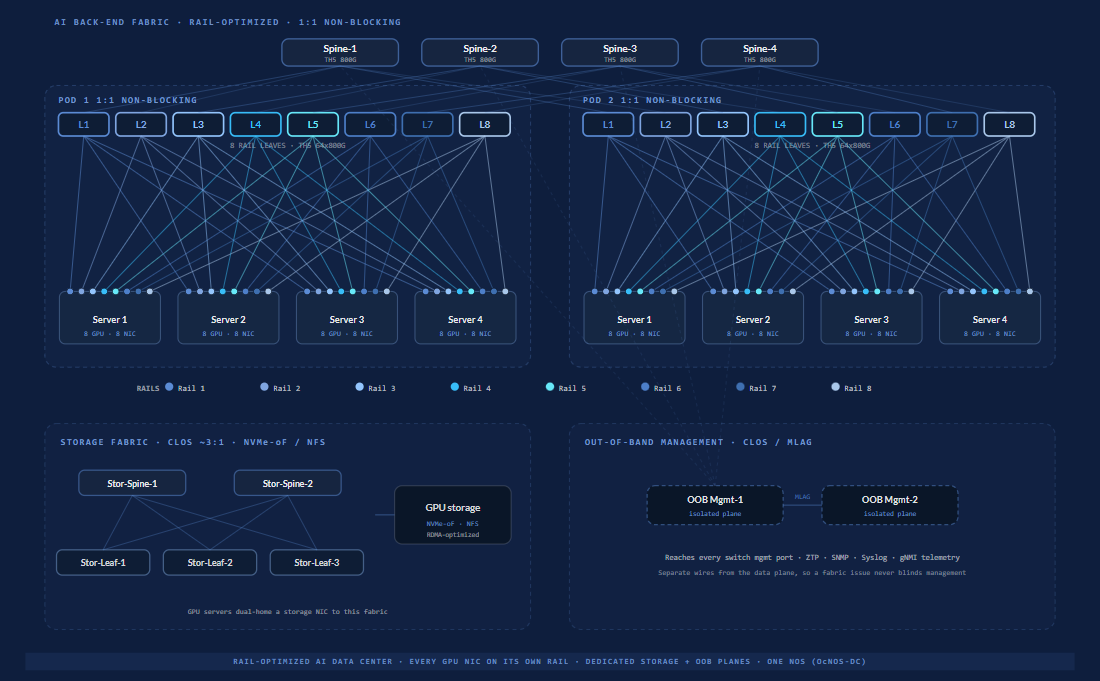
OcNOS pieces: BGP-unnumbered L3 underlay, RoCEv2 lossless (PFC + ECN) on every rail leaf, DLB at the spine tier, gNMI/OpenConfig telemetry throughout. Built on HCL-listed Tomahawk 5 hardware: the Edgecore AIS800-64D and UfiSpace S9321-64E (64×800G).
Rail-optimized, rail-only, and ToR, side by side
The choice is about what the fabric aligns to. A rail layout aligns each GPU rank to a network plane, so same-rank GPUs across the cluster share a leaf and the collective completes with the lowest hop count. A ToR layout aligns to the server: every NIC in one server lands on its rack switch, simpler to cable but forcing same-rank GPUs in different racks up to the spine and back. For GPU training fabrics where AllReduce dominates, rail alignment is the standard; ToR stays a fine choice for storage and general-purpose racks where traffic is not rank-synchronous.
| Property | Rail-optimizedsingle-pod standard | Rail-onlysmall-cluster entry | Top-of-rack (ToR)server-aligned |
|---|---|---|---|
| Alignment | Each GPU rank aligned to a network plane; NIC-N from every server homes to leaf-N. | Same rail alignment: NIC-N homes to rail leaf-N, but only a single row of leaves. | Network aligned to the server; every NIC in a server homes to its own rack switch. |
| Spine tier | 1:1 non-blocking spine above the rail leaves. | No spine tier; the rail leaves stand alone. | Standard spine above the rack switches. |
| Cross-rail path | A real network path through the non-blocking spine. | Leans on the in-server GPU scale-up domain; no fabric route once it outgrows one domain. | Rank-synchronous traffic is pushed up to the spine. |
| Collective hop count | Lowest: same-rank peers share a leaf, so intra-rail AllReduce stays on one leaf. | Also low intra-rail, since the rail is still one leaf. | Higher: same-rank peers in different racks sit on different switches, so collectives cross the spine. |
| Best fit | The standard single-pod scalable unit for GPU training and inference fabrics. | A handful of racks below one scale-up domain; the entry point. | Storage, CPU, and general-purpose racks where traffic is not rank-synchronous. |
How far a rail-optimized fabric scales
Scale is set by the switch radix and by how each 800G port maps to GPUs. On Broadcom Tomahawk 5 (51.2 Tbps, 64×800G or 128×400G), the designs run from a 2-tier leaf-spine up to three tiers with a super-spine. Because most collective traffic stays rail-local, the super-spine plane is sized only to the cross-pod ratio you actually need. For context, Meta has publicly described a 24,576-GPU Ethernet-based AI training cluster, which shows Ethernet fabrics operating well beyond a single pod.
2-tier, 1:1 non-blocking
Rail-optimized leaf-spine at 800G per GPU, each GPU on two 400G leaf ports: 128 leaves, 64 spines. The largest two-tier pod on this silicon.
2-tier at 400G per GPU
The same 2-tier design for GPUs with one 400G NIC each.
3-tier, super-spine
Above 4,096 GPUs, add a super-spine tier above rail-optimized pods. Each pod stays 1:1 non-blocking; the super-spine sets the cross-pod ratio.
Sizing your own cluster? The AI Fabric Design Suite sizes a non-blocking two-tier leaf-spine pod and flags when you cross into three-tier scale. For the full topology picture, see the AI fabric topologies reference.
How OcNOS-DC builds a rail-optimized fabric
OcNOS-DC turns HCL-listed Tomahawk 5 switches into a rail-optimized fabric with a routed underlay, a lossless RoCEv2 substrate, dynamic load balancing, and streaming telemetry. It is one system: qualified hardware, the OcNOS-DC network operating system, and a single support contract with one TAC and one SLA.
BGP-unnumbered L3
A routed underlay with BGP unnumbered removes per-link address planning and spreads traffic across every rail-to-spine path with ECMP.
RoCEv2 with PFC + ECN
OcNOS-DC provides the lossless Ethernet substrate that RoCEv2 requires: PFC keeps the priority lossless and ECN marks congestion. RoCEv2 itself is the NIC transport riding on that substrate.
Dynamic Load Balancing
DLB spreads elephant flows by real-time path quality instead of a static hash, so cross-rail traffic does not pile onto one uplink and a well-run fabric can target utilization above 90 percent on Tomahawk 4/5.
gNMI / OpenConfig
Telemetry streams over gNMI with OpenConfig models, so you tune the fabric with closed-loop data during cluster bring-up.
HCL-listed Tomahawk 5
Runs on qualified 64×800G switches: Edgecore AIS800-64D and UfiSpace S9321-64E. Every leaf and spine here is on the OcNOS Hardware Compatibility List.
Ultra Ethernet Consortium member
IP Infusion is a member of the Ultra Ethernet Consortium (UEC). UEC 1.0 defines a multipath Ethernet transport that spreads one flow across many paths, running on UEC-capable NICs.
Get the AI Fabric Reference Design
The full PDF: rail-optimized topology, switch and transceiver counts, qualified platforms, and a RoCEv2 lossless starting profile on OcNOS-DC.
Get the AI Fabric Reference Design
Quick form: your PDF will download immediately after submit.
✓ Opening your PDF in a new tab…
If it didn't open, use the link below.
Rail-optimized network FAQ
What is a rail-optimized network?
What is the difference between rail-optimized and rail-only?
Rail vs ToR: which layout should an AI fabric use?
How many GPUs does a rail-optimized fabric scale to?
Does a rail-optimized network need InfiniBand?
How does OcNOS-DC implement a rail-optimized fabric?
Go deeper. Take it with you.
The product datasheet plus short, technical downloads that go further than this page.
OcNOS-DC Datasheet
Full OcNOS-DC specification: the EVPN-VXLAN and Ethernet for AI feature set, software SKUs, supported hardware platforms, and the solution ordering guide.
Get the datasheetOcNOS 800G Lossless AI Fabric
Lossless RoCEv2 fabric on Tomahawk 5 spines: SKU tiers, qualified platforms, and deployment architecture.
Get the briefEVPN-VXLAN Data Center Fabric
Leaf-spine data center fabric on EVPN-VXLAN: a VRF and VNIs per tenant, EVPN multihoming, BGP unnumbered and route-target filtering.
Get the briefOcNOS-DC Datasheet
Quick form. Your PDF opens in a new tab immediately after submit.
✓ Opening your PDF in a new tab…
If it didn't open, use the link below.
OcNOS 800G Lossless AI Fabric
Quick form. Your PDF opens in a new tab immediately after submit.
✓ Opening your PDF in a new tab…
If it didn't open, use the link below.
EVPN-VXLAN Data Center Fabric
Quick form. Your PDF opens in a new tab immediately after submit.
✓ Opening your PDF in a new tab…
If it didn't open, use the link below.
Planning a rail-optimized GPU fabric? We will do the port-count maths with you.
Tell us the GPU scale and the rail count, and an IP Infusion engineer will size the leaf-spine pod with you, or start with a first-pass layout in the AI Fabric Design Suite.
Design the whole AI fabric with OcNOS
From the business case to the port-count maths, pick up wherever you are in the build.