In an EVPN-VXLAN overlay, when multiple VTEPs advertise the same EVPN Type-5 IP prefix, OcNOS installs all equal-cost VTEP next-hops as ECMP entries. A 5-tuple hash spreads flows across them with no load balancer in the data path, supporting up to 8 paths on IP Infusion's open switches.
Equal-Cost Multipath (ECMP) is fundamental to data center fabric design. It maximizes link utilization and builds in redundancy without complex failover logic. In an EVPN-VXLAN overlay, ECMP works at both the underlay (between leaf and spine switches) and the overlay (across multiple hypervisors hosting the same service).
This two-part series covers overlay ECMP using EVPN with VXLAN encapsulation in OcNOS. Part 1 establishes the topology and configuration for distributing traffic across multiple hypervisors. Part 2 extends this to advanced multi-hypervisor scenarios.
Data Center Clos Topology
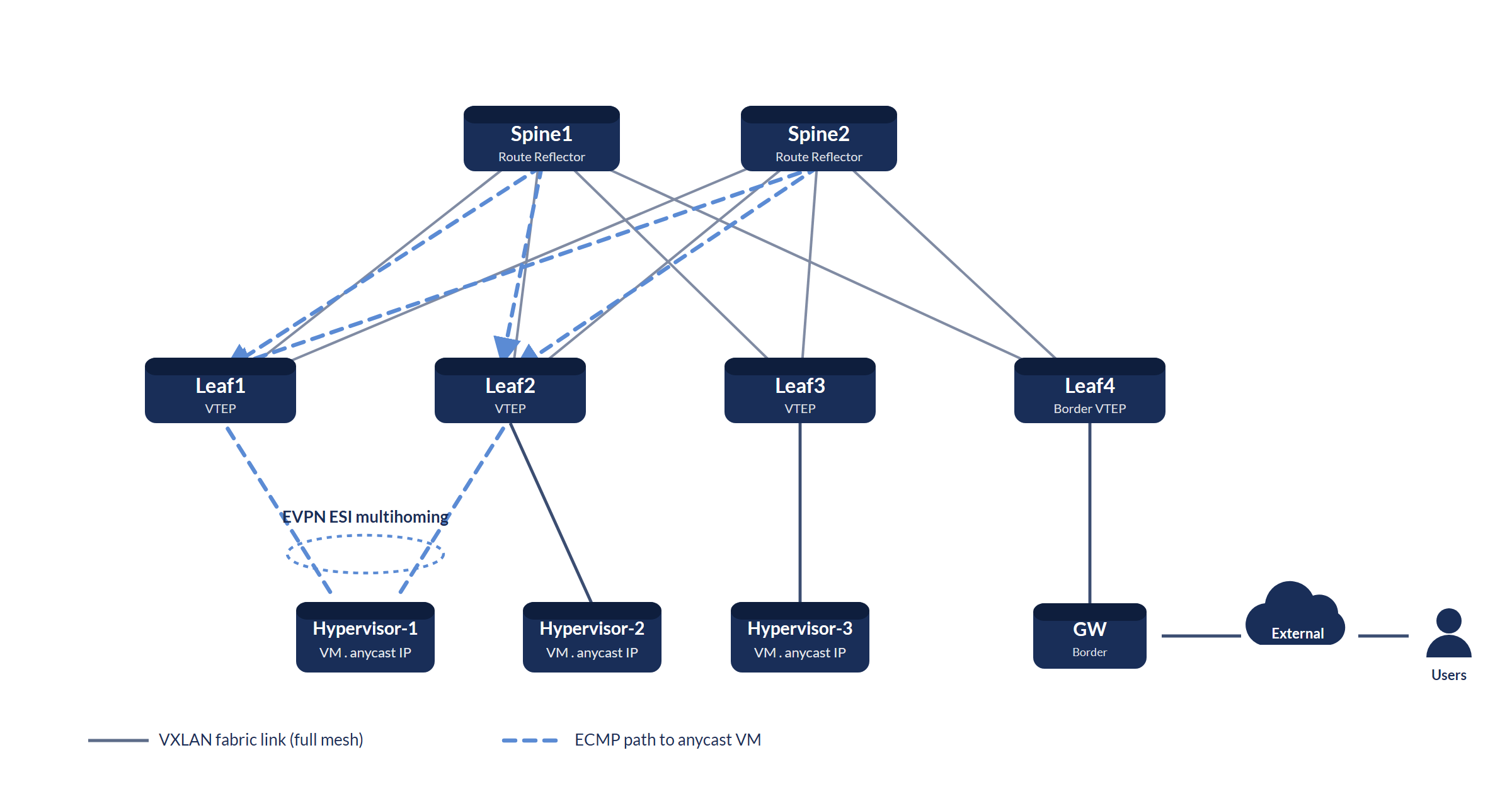
How Overlay ECMP Works
In a standard EVPN-VXLAN fabric, each hypervisor advertises its locally hosted VMs via BGP EVPN. When multiple hypervisors host VMs with identical IP addresses (a common pattern for web-tier microservices with anycast VIPs), the leaf switches receive multiple EVPN route type-5 (IP prefix) advertisements for the same IP prefix, each from a different VTEP.
OcNOS installs all equal-cost VTEP routes as ECMP next-hops in the forwarding table. Ingress traffic is hashed across all VTEPs using a 5-tuple hash (source IP, destination IP, source port, destination port, protocol), distributing load without requiring a load balancer in the data path.
The configuration below is an illustrative reference. IP addresses, VNIDs, and interface names are consistent placeholders; substitute the values for your fabric.
Underlay Configuration: BGP EVPN Spine
! OcNOS Spine-1: BGP Route Reflector for EVPN
!
router bgp 65000
  bgp router-id 10.0.0.10
  bgp cluster-id 10.0.0.10
  !
  ! Reflect EVPN routes to all leaf peers
  neighbor LEAF-PEERS peer-group
  neighbor LEAF-PEERS remote-as 65000
  neighbor LEAF-PEERS update-source lo
  neighbor LEAF-PEERS route-reflector-client
  !
  neighbor 10.1.1.1 peer-group LEAF-PEERS    ! Leaf-1
  neighbor 10.1.1.2 peer-group LEAF-PEERS    ! Leaf-2
  neighbor 10.1.1.3 peer-group LEAF-PEERS    ! Leaf-3
  !
  address-family l2vpn evpn
    neighbor LEAF-PEERS activate
    neighbor LEAF-PEERS route-reflector-client
  exit-address-family
!
commitOverlay Configuration: EVPN-VXLAN on Leaf (OcNOS)
! OcNOS Leaf-1: EVPN-VXLAN with overlay ECMP
!
! Step 1: Enable VXLAN and set the global VTEP source IP
nvo vxlan enable
nvo vxlan vtep-ip-global 10.1.1.1        ! VTEP IP (loopback)
!
! Step 2: Create the VXLAN network identifier (VNID)
nvo vxlan id 10100 ingress-replication   ! VNID 10100
!
! Step 3: Map an access interface/VLAN to the VNID
nvo vxlan access-if port-vlan <access-port> 100
  map vnid 10100                         ! VLAN 100 -> VNID 10100
!
! Step 4: Use EVPN-BGP as the host-reachability control plane
vxlan host-reachability-protocol evpn-bgp <vrf-name>
!
! Step 5: BGP EVPN - advertise and receive routes
router bgp 65000
  bgp router-id 10.1.1.1
  neighbor 10.0.0.10 remote-as 65000     ! Spine-1 (RR)
  neighbor 10.0.0.10 update-source lo
  neighbor 10.0.0.11 remote-as 65000     ! Spine-2 (RR)
  neighbor 10.0.0.11 update-source lo
  !
  address-family l2vpn evpn
    neighbor 10.0.0.10 activate
    neighbor 10.0.0.11 activate
  exit-address-family
!
! Step 6: Enable ECMP (multiple equal-cost next-hops per prefix)
! maximum-paths is set at (config), outside router bgp; the default is 8
exit
maximum-paths 8                          ! install up to 8 ECMP paths
!
commit
end
!
! Verify: IP-X (web service VIP) should be learned from
! VTEP 10.1.1.1, 10.1.1.2, and 10.1.1.3
show bgp l2vpn evpn
!
show nvo vxlan
show nvo vxlan tunnel
Verifying ECMP Load Distribution
! OcNOS: Verify overlay ECMP is active
!
! Check ECMP paths installed in the routing table for IP-X:
show ip route 192.168.100.10/32     ! IP-X host route
!
! Check VXLAN tunnels per remote VTEP:
show nvo vxlan tunnel
!
! Review EVPN control-plane state:
show bgp summary
show bgp l2vpn evpn
Continue with Part 2: Advanced multi-hypervisor ECMP scenarios, where we increase VM density per hypervisor and explore how OcNOS handles subnet advertisement changes.
IP Infusion Engineering Team
Go deeper. Take it with you.
The product datasheet plus short, technical downloads that go further than this page.
OcNOS-DC Datasheet
Full OcNOS-DC specification: the EVPN-VXLAN and Ethernet for AI feature set, software SKUs, supported hardware platforms, and the solution ordering guide.
Get the datasheetEVPN-VXLAN Data Center Fabric
Carrier-grade leaf-spine data center fabric: symmetric IRB, Type-2/Type-5 routes, and distributed anycast gateway.
Get the briefOcNOS 800G Lossless AI Fabric
Non-blocking RoCEv2 fabric on Broadcom Tomahawk 4/5 spines: SKU tiers, validated platforms, and deployment architecture.
Get the briefOcNOS-DC Datasheet
Quick form. Your PDF opens in a new tab immediately after submit.
✓ Opening your PDF in a new tab…
If it didn't open, use the link below.
EVPN-VXLAN Data Center Fabric
Quick form. Your PDF opens in a new tab immediately after submit.
✓ Opening your PDF in a new tab…
If it didn't open, use the link below.
OcNOS 800G Lossless AI Fabric
Quick form. Your PDF opens in a new tab immediately after submit.
✓ Opening your PDF in a new tab…
If it didn't open, use the link below.