Equal-Cost Multipath (ECMP) is fundamental to data center fabric design. It maximizes link utilization and builds in redundancy without complex failover logic. In an EVPN-VXLAN overlay, ECMP works at both the underlay (between leaf and spine switches) and the overlay (across multiple hypervisors hosting the same service).
This two-part series covers overlay ECMP using EVPN with VXLAN encapsulation in OcNOS. Part 1 establishes the topology and configuration for distributing traffic across multiple hypervisors. Part 2 extends this to advanced multi-hypervisor scenarios.
Data Center Clos Topology
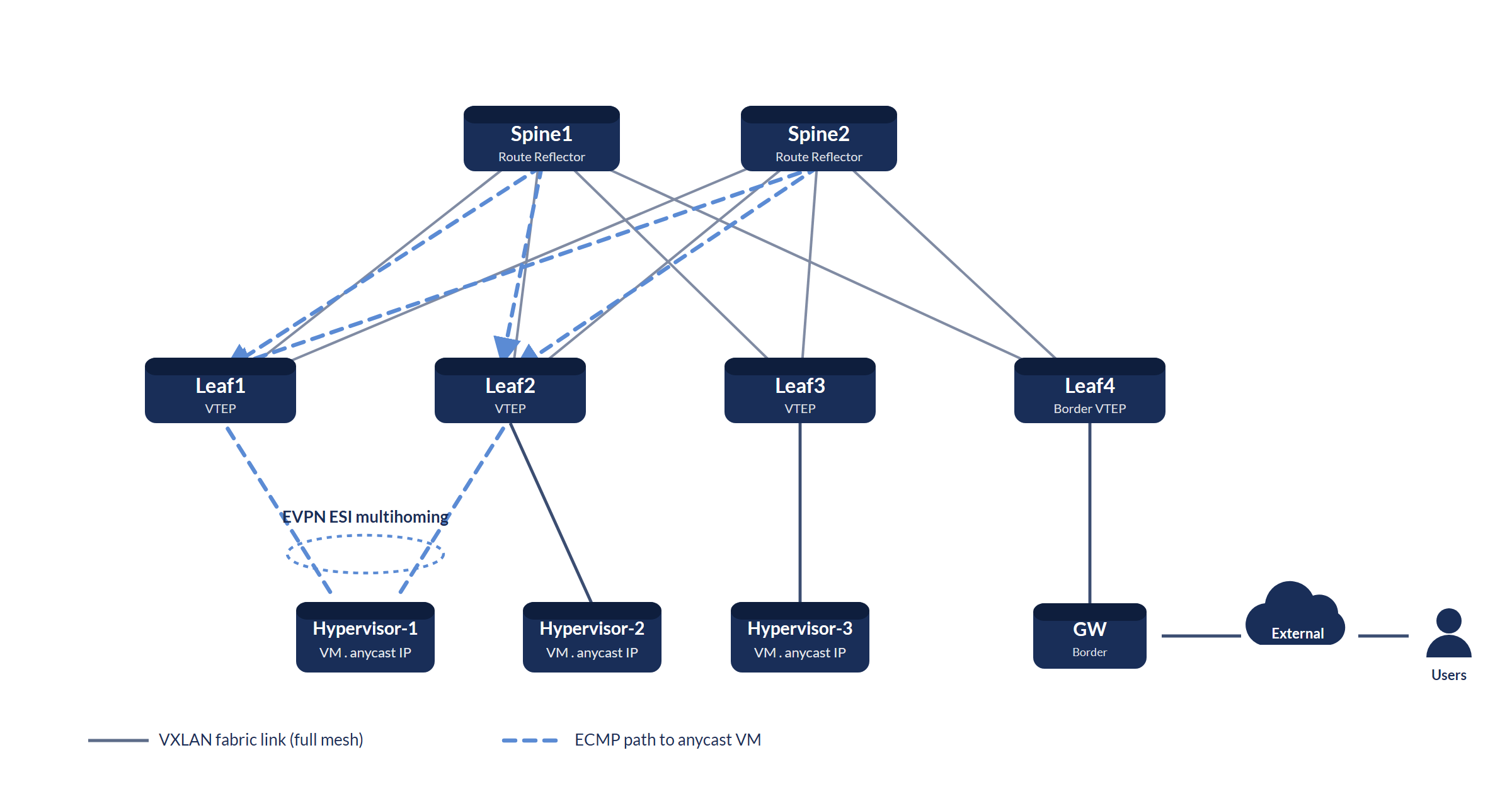
How Overlay ECMP Works
In a standard EVPN-VXLAN fabric, each hypervisor advertises its locally hosted VMs via BGP EVPN. When multiple hypervisors host VMs with identical IP addresses (a common pattern for web-tier microservices with anycast VIPs), the leaf switches receive multiple EVPN route type-5 (IP prefix) advertisements for the same IP prefix, each from a different VTEP.
OcNOS installs all equal-cost VTEP routes as ECMP next-hops in the forwarding table. Ingress traffic is hashed across all VTEPs using a 5-tuple hash (source IP, destination IP, source port, destination port, protocol), distributing load without requiring a load balancer in the data path.
The configuration below is an illustrative reference. IP addresses, VNIDs, and interface names are consistent placeholders; substitute the values for your fabric.
Underlay Configuration: BGP EVPN Spine
! OcNOS Spine-1: BGP Route Reflector for EVPN
!
router bgp 65000
  bgp router-id 10.0.0.10
  bgp cluster-id 10.0.0.10
  !
  ! Reflect EVPN routes to all leaf peers
  neighbor LEAF-PEERS peer-group
  neighbor LEAF-PEERS remote-as 65000
  neighbor LEAF-PEERS update-source lo
  neighbor LEAF-PEERS route-reflector-client
  !
  neighbor 10.1.1.1 peer-group LEAF-PEERS    ! Leaf-1
  neighbor 10.1.1.2 peer-group LEAF-PEERS    ! Leaf-2
  neighbor 10.1.1.3 peer-group LEAF-PEERS    ! Leaf-3
  !
  address-family l2vpn evpn
    neighbor LEAF-PEERS activate
    neighbor LEAF-PEERS route-reflector-client
  exit-address-family
!
commitOverlay Configuration: EVPN-VXLAN on Leaf (OcNOS)
! OcNOS Leaf-1: EVPN-VXLAN with overlay ECMP
!
! Step 1: Enable VXLAN and set the global VTEP source IP
nvo vxlan enable
nvo vxlan vtep-ip-global 10.1.1.1        ! VTEP IP (loopback)
!
! Step 2: Create the VXLAN network identifier (VNID)
nvo vxlan id 10100 ingress-replication   ! VNID 10100
!
! Step 3: Map an access interface/VLAN to the VNID
nvo vxlan access-if port-vlan <access-port> 100
  map vnid 10100                         ! VLAN 100 -> VNID 10100
!
! Step 4: Use EVPN-BGP as the host-reachability control plane
vxlan host-reachability-protocol evpn-bgp <vrf-name>
!
! Step 5: BGP EVPN - advertise and receive routes
router bgp 65000
  bgp router-id 10.1.1.1
  neighbor 10.0.0.10 remote-as 65000     ! Spine-1 (RR)
  neighbor 10.0.0.10 update-source lo
  neighbor 10.0.0.11 remote-as 65000     ! Spine-2 (RR)
  neighbor 10.0.0.11 update-source lo
  !
  address-family l2vpn evpn
    neighbor 10.0.0.10 activate
    neighbor 10.0.0.11 activate
  exit-address-family
!
! Step 6: Enable ECMP (multiple equal-cost next-hops per prefix)
router bgp 65000
  address-family l2vpn evpn
    maximum-paths 8                      ! install up to 8 ECMP paths
  exit-address-family
!
commit
!
! Verify: IP-X (web service VIP) should be learned from
! VTEP 10.1.1.1, 10.1.1.2, and 10.1.1.3
show bgp l2vpn evpn
!
show nvo vxlan
show nvo vxlan tunnel
Verifying ECMP Load Distribution
! OcNOS: Verify overlay ECMP is active
!
! Check ECMP paths installed in the routing table for IP-X:
show ip route 192.168.100.10/32     ! IP-X host route
!
! Check VXLAN tunnels per remote VTEP:
show nvo vxlan tunnel
!
! Review EVPN control-plane state:
show bgp summary
show bgp l2vpn evpn
Continue with Part 2: Advanced multi-hypervisor ECMP scenarios, where we increase VM density per hypervisor and explore how OcNOS handles subnet advertisement changes.
IP Infusion Engineering Team
深入了解,隨身帶走。
產品規格書,以及內容比本頁更為深入的簡明技術下載資料。
EVPN-VXLAN 資料中心網路
表單簡短。提交後您的 PDF 將立即在新標籤頁中打開。
✓ 正在新標籤頁中打開您的 PDF……
如果未能自動打開,請使用下方連結。
OcNOS 800G 無損 AI Fabric
表單簡短。提交後您的 PDF 將立即在新標籤頁中打開。
✓ 正在新標籤頁中打開您的 PDF……
如果未能自動打開,請使用下方連結。