Designing a modern network takes more homework than it used to. A single deployment decision can hinge on feature support, hardware compatibility, ASIC capabilities, and software licensing, and those answers usually sit in separate datasheets, release notes, and hardware guides. For anyone evaluating open networking, that means a lot of cross-referencing before you can trust a design. The OcNOS Solution Explorer is built to remove that step.
How it works
Select features in the Feature Matrix. A “See matching hardware” button shows how many platforms support all of them and opens the Hardware Compatibility List with those platforms ready to compare. From the HCL, “See features” takes you back with your platforms selected. Move between the two until your shortlist is feature-complete, license-correct, and hardware-qualified, ready for a design review or an RFP.
Why hardware compatibility matters in open networking
In traditional networking, the software and the hardware ship bundled, so compatibility is a given. In open networking you choose the network operating system and the hardware separately. That gives you flexibility and pricing leverage, and it also means a feature’s availability can depend on the platform, the ASIC family, the optics, and the software release. The Solution Explorer makes those dependencies explicit, so you can confirm a design holds together before you buy.
Which platforms fit AI fabric, broadband, and EVPN?
| Use case | Key technologies | OcNOS edition | Platform type |
|---|---|---|---|
| AI fabric | RoCEv2, PFC, ECN, DCB | OcNOS-DC | Tomahawk-class switches |
| Broadband Aggregation | MPLS, Segment Routing, H-QoS | OcNOS-SP | Jericho / Qumran edge |
| EVPN data center | EVPN-VXLAN, MLAG, VXLAN routing | OcNOS-DC | Trident / Tomahawk |
Only validated, shipping features
The Feature Matrix lists only features that are officially supported on OcNOS: shipping, validated, and commercially supported. There are no roadmap placeholders and no lab-only entries. If a feature is listed against a platform, it runs in production today. That is what lets you design and quote against the matrix with confidence, instead of finding a gap late in a lab or a production cutover.
Where it helps
- Scoping an RFP: build a requirement list and get the platforms and licenses that meet it.
- Choosing hardware: start from a use case and narrow to qualified platforms by vendor, ASIC, or port speed.
- Planning licenses: see the exact OcNOS tier each feature needs before you quote.
- De-risking a design: every feature listed is shipping and validated, not roadmap.
Frequently asked questions
Explore the deployment architectures
Once you have your features and platforms, these briefs go deeper on real-world OcNOS designs: AI fabric, SR-MPLS, IPoDWDM, and data center interconnect.
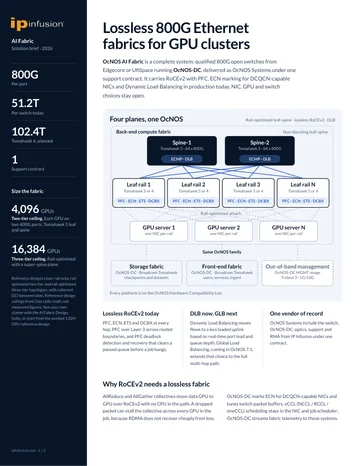
OcNOS 800G Lossless AI Fabric
Lossless RoCEv2 fabric on Tomahawk 5 spines: SKU tiers, qualified platforms, and deployment architecture.
Get the brief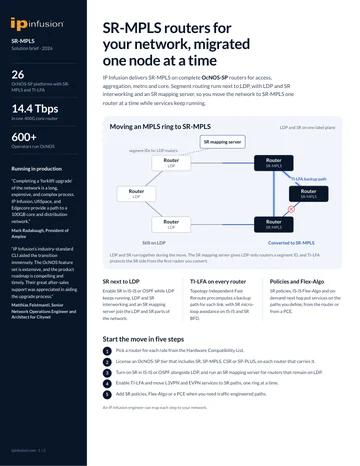
SR-MPLS Upgrade with OcNOS
Migrate SR-MPLS onto OcNOS on open hardware: Flex-Algo, TI-LFA, and a node-by-node cutover path.
Get the brief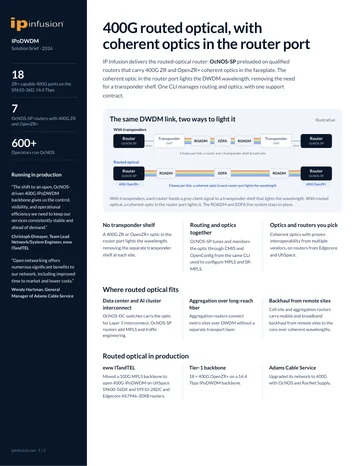
IPoDWDM with 400G OpenZR+
Collapse the transponder layer with 400G OpenZR+ coherent optics pluggable directly into the router.
Get the brief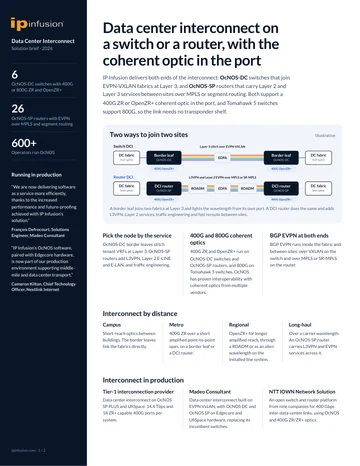
Data Center Interconnect Solution Brief
Data center interconnect on an OcNOS-DC switch or an OcNOS-SP router, with a 400G ZR or OpenZR+ coherent optic in the port.
Get the briefOcNOS 800G Lossless AI Fabric
Quick form. Your PDF opens in a new tab immediately after submit.
✓ Opening your PDF in a new tab…
If it didn't open, use the link below.
SR-MPLS Upgrade with OcNOS
Quick form. Your PDF opens in a new tab immediately after submit.
✓ Opening your PDF in a new tab…
If it didn't open, use the link below.
IPoDWDM with 400G OpenZR+
Quick form. Your PDF opens in a new tab immediately after submit.
✓ Opening your PDF in a new tab…
If it didn't open, use the link below.
Data Center Interconnect Solution Brief
Quick form. Your PDF opens in a new tab immediately after submit.
✓ Opening your PDF in a new tab…
If it didn't open, use the link below.