OcNOS automates network deployment through Ansible, NETCONF, and gNMI, pushing repeatable, auditable device configuration at scale. Because OcNOS exposes native YANG and OpenConfig data models, teams manage configuration and state programmatically rather than by hand, cutting errors and rollout time across large fleets.
As networks grow in size and complexity, manual configuration becomes the primary bottleneck for both new deployments and day-2 operations. A service provider managing hundreds of cell site routers cannot afford to configure each one individually. A data center operator managing dozens of leaf switches needs a repeatable, auditable way to push VXLAN fabric configurations. OcNOS supports multiple automation interfaces that integrate with the tools network teams already use.
OcNOS Automation Interfaces
| Interface | Protocol | Best For | Data Model |
|---|---|---|---|
| NETCONF | SSH/XML | Ansible, Terraform, custom scripts | Native YANG + OpenConfig |
| gNMI | gRPC | Telemetry, config push, streaming | OpenConfig + native |
| CLI via SSH | SSH | Ansible raw module, Expect scripts | CLI text |
| REST API | HTTPS | IP Maestro integration, custom apps | JSON |
Ansible + NETCONF: Configuration Deployment
# Ansible playbook: deploy IS-IS SR config to multiple OcNOS nodes
# inventory.yaml defines hosts with NETCONF connection

- name: Deploy IS-IS SR configuration
  hosts: ocnos_sp_nodes
  connection: netconf
  gather_facts: false

  vars:
    isis_net_prefix: "49.0001"
    srgb_start: 16000
    srgb_end: 23999

  tasks:
    - name: Configure IS-IS SR on each node
      netconf_config:
        content: |
          <config>
            <routing xmlns="urn:ietf:params:xml:ns:yang:ietf-routing">
              <control-plane-protocols>
                <control-plane-protocol>
                  <type>isis</type>
                  <name>CORE</name>
                  <isis xmlns="urn:ietf:params:xml:ns:yang:ietf-isis">
                    <interfaces>
                      <interface>
                        <name>{{ ansible_host_loopback }}</name>
                        <passive>true</passive>
                      </interface>
                    </interfaces>
                  </isis>
                </control-plane-protocol>
              </control-plane-protocols>
            </routing>
          </config>

    - name: Verify IS-IS neighbors via NETCONF get
      netconf_get:
        filter: |
          <routing-state xmlns="urn:ietf:params:xml:ns:yang:ietf-routing">
            <routing-instance>
              <routing-protocols>
                <routing-protocol>
                  <isis xmlns="urn:ietf:params:xml:ns:yang:ietf-isis">
                    <adjacencies/>
                  </isis>
                </routing-protocol>
              </routing-protocols>
            </routing-instance>
          </routing-state>
      register: isis_state

    - name: Assert all neighbors are UP
      assert:
that: "'UP' in isis_state.output"gNMI: Real-Time Config Push and State Retrieval
! First enable gNMI on the OcNOS device. gNMI runs over gRPC and
! listens on port 9339 once streaming telemetry is enabled:
!
!   OcNOS# configure terminal
!   OcNOS(config)# feature streaming-telemetry
! gNMI CLI (gnmic tool) -- push configuration to OcNOS
!
# Install gnmic:
bash -c "$(curl -sL https://get-gnmic.openconfig.net)"

# Push interface description via gNMI Set:
gnmic -a 10.0.0.1:9339 -u admin -p admin --insecure set   --update-path '/interfaces/interface[name=xe1]/config/description'   --update-value '"Uplink to Spine-1"'

# Get current BGP neighbor state:
gnmic -a 10.0.0.1:9339 -u admin -p admin --insecure get   --path '/network-instances/network-instance[name=default]/protocols/protocol/bgp/neighbors/neighbor[neighbor-address=10.0.0.2]/state'

# Subscribe to interface state changes (on-change):
gnmic -a 10.0.0.1:9339 -u admin -p admin --insecure subscribe   --path '/interfaces/interface/state/oper-status'   --mode on-change
Zero-Touch Provisioning Pattern
! OcNOS -- ZTP hook: execute script on first boot
!
! OcNOS supports a ZTP boot script that runs when no startup config exists.
! The script can pull configuration from a DHCP/TFTP/HTTP server:
!
! 1. DHCP option 67 points to ZTP script URL
! 2. OcNOS downloads and executes the script on first boot
! 3. Script fetches device-specific config based on MAC/serial number
! 4. Config is applied via CLI or NETCONF
!
! Example ZTP script (Python, runs on OcNOS):
! import subprocess, urllib.request
! serial = subprocess.check_output(['show', 'version'], text=True)
! config_url = f"http://ztp-server/configs/{serial.strip()}.cfg"
! urllib.request.urlretrieve(config_url, '/tmp/startup.cfg')
! subprocess.run(['copy', '/tmp/startup.cfg', 'running-config'])- OcNOS Config Backups with Ansible
- gNMI Streaming Telemetry Guide
- IP Maestro: GUI Management for OcNOS
- Contact IP Infusion
IP Infusion Engineering Team
Go deeper. Take it with you.
Two short, technical downloads that go further than this page: the full OcNOS-SP datasheet and the full OcNOS-DC datasheet.
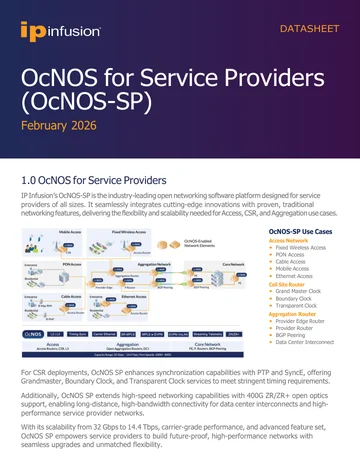
OcNOS-SP Datasheet
Full OcNOS-SP specification: the access, cell site and aggregation feature set, software SKUs, supported hardware platforms, and the solution ordering guide.
Get the datasheet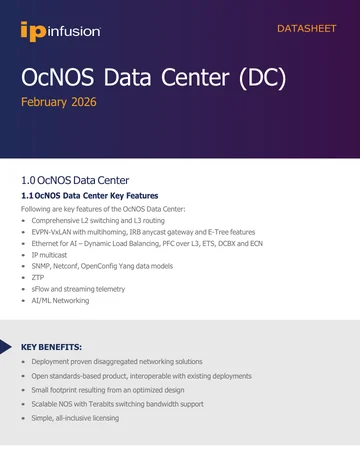
OcNOS-DC Datasheet
Full OcNOS-DC specification: the EVPN-VXLAN and Ethernet for AI feature set, software SKUs, supported hardware platforms, and the solution ordering guide.
Get the datasheetOcNOS-SP Datasheet
Quick form. Your PDF opens in a new tab immediately after submit.
✓ Opening your PDF in a new tab…
If it didn't open, use the link below.
OcNOS-DC Datasheet
Quick form. Your PDF opens in a new tab immediately after submit.
✓ Opening your PDF in a new tab…
If it didn't open, use the link below.