GNS3 is one of the most popular network simulation platforms for building multi-vendor topologies. Its visual drag-and-drop interface and QEMU/KVM integration make it an ideal environment for running multiple OcNOS VM instances side by side, testing IS-IS adjacencies, BGP peering, MPLS label distribution, and EVPN services across a realistic multi-node topology before touching any hardware.
Prerequisites
- GNS3 installed (version 2.2+ recommended) with GNS3 VM for QEMU support
- OcNOS Demo VM downloaded from IP Infusion’s website (QEMU image format)
- Minimum 8GB RAM available for a 3-node topology (each OcNOS VM requires ~1.5-2GB)
- Linux or macOS host recommended; Windows requires GNS3 VM via VMware/VirtualBox
Importing OcNOS into GNS3
# Shell commands for GNS3 VM (Linux) -- prepare OcNOS QEMU image
#
# Step 1: Copy OcNOS QEMU image to GNS3 images directory
cp OcNOS-Demo-VM.qcow2 ~/GNS3/images/QEMU/

# Step 2: In GNS3 GUI -- Edit > Preferences > QEMU VMs > New
# Configure:
#   Name: OcNOS
#   QEMU binary: /usr/bin/qemu-system-x86_64
#   RAM: 1536 MB (minimum), 2048 MB recommended
#   HDA disk image: OcNOS-Demo-VM.qcow2
#   Network adapters: 8 (eth0 through eth7; eth0 is the management interface)
#   Console type: telnet

# Step 3: Verify OcNOS appliance appears in GNS3 device panel
# Drag OcNOS nodes into topology canvas and connect themSample 3-Node IS-IS SR Topology in GNS3
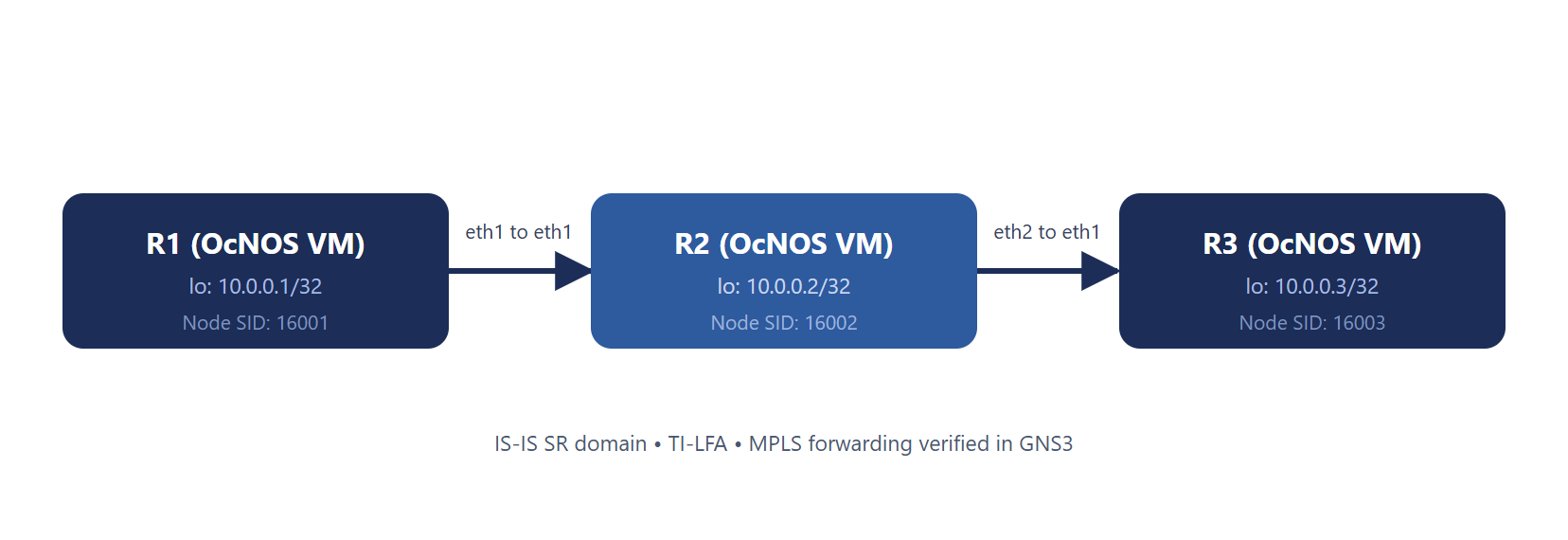
! OcNOS VM in GNS3 -- R1 IS-IS SR configuration
! (Apply the same pattern to R2 and R3 with their own addresses and SIDs)
!
configure terminal
!
interface lo
  ip address 10.0.0.1/32 secondary
  ip router isis CORE
  prefix-sid index 1
  exit
!
interface eth1
  no shutdown
  ip address 192.168.12.1/30
  label-switching
  ip router isis CORE
  isis network point-to-point
  isis wide-metric 10
  exit
!
router isis CORE
  net 49.0001.0000.0000.0001.00
  is-type level-2-only
  metric-style wide
  mpls traffic-eng router-id 10.0.0.1
  mpls traffic-eng level-2
  segment-routing mpls
  fast-reroute ti-lfa level-2 proto ipv4
  exit
!
commit
exit
!
! Note: segment-routing mpls will not commit unless MPLS TE is enabled on the
! same level. Without mpls traffic-eng level-2 the commit fails with
! "%% MPLS TE is not enabled on this level".
!
! Verify from R1:
show clns neighbors
show isis segment-routing state
show mpls forwarding-table
! Ping the R3 loopback over SR-MPLS:
ping mpls ipv4 10.0.0.3/32
Tips for Running Multiple OcNOS VMs in GNS3
- Use GNS3 VM: running OcNOS QEMU images requires KVM acceleration; the GNS3 VM on VMware ESXi or Workstation provides nested virtualization
- Snapshot frequently: save GNS3 snapshots after each major topology milestone so you can roll back without reconfiguring from scratch
- Console all nodes: use GNS3’s “Console all” feature to open terminal sessions to all OcNOS VMs simultaneously
- Disable unused interfaces: OcNOS VM boots with all interfaces up; shut down unused ones to reduce log noise
IP Infusion Product Team