OcNOS 6.4 for Data Centers is now generally available. This release focuses on operational visibility and policy precision, two requirements that define mature data center NOS deployments at scale. The headline addition is gNMI-based streaming telemetry with OpenConfig YANG models, giving DC operators real-time insight into fabric state using standardized, vendor-neutral interfaces.
gNMI Streaming Telemetry with OpenConfig
OcNOS 6.4 DC supports gNMI server dial-in mode: network monitoring systems subscribe to OcNOS data center switches and receive real-time streaming data using OpenConfig YANG data models. This is the industry-standard path away from SNMP polling toward event-driven network observability.
! OcNOS 6.4 DC -- gNMI OpenConfig streaming telemetry
!
! OcNOS builds a subscription from three separate top-level objects:
! a sensor-group, a destination-group, and a subscription-name that binds them.
configure terminal
!
feature streaming-telemetry
!
sensor-group OC-INTERFACES
  sensor-path /interfaces/interface/state/counters
  sensor-path /interfaces/interface/state/oper-status
  exit
!
destination-group COLLECTOR
  tunnel-server ip 10.100.0.50 port 9339
  exit
!
subscription-name FABRIC-OC
  sensor-group OC-INTERFACES sample-interval 10    ! seconds, not milliseconds
  destination-group COLLECTOR
  encoding json-ietf
  exit
!
commit
exit
!
! Verify:
show streaming-telemetry persistent-subscriptions brief
show streaming-telemetry persistent-subscriptions detailsEVPN Route Target Filtering
OcNOS 6.4 DC introduces Route Target (RT) filtering for EVPN-VXLAN deployments. In large multi-tenant fabrics with many VNIs, selective RT import and export controls prevent unnecessary route propagation, reduce control-plane memory consumption, and improve BGP convergence speed.
! OcNOS 6.4 DC -- EVPN RT filtering for multi-tenant isolation
!
configure terminal
!
router bgp 65001
  address-family l2vpn evpn
    !
    ! Import only specific RT communities from this neighbor
    neighbor 10.0.0.2 route-map RT-FILTER in
    !
    ! Export selected routes to DCI peers only
    neighbor 10.200.0.1 route-map DCI-EXPORT out
    exit-address-family
  exit
!
ip extcommunity-list standard RT-LIST permit rt 65001:10001
ip extcommunity-list standard RT-LIST permit rt 65001:10002
!
route-map RT-FILTER permit 10
  match extcommunity RT-LIST
  exit
!
commit
exit
!
! Verify RT filtering is active:
show bgp l2vpn evpn summary
show bgp l2vpn evpn prefix-route
Selective Packet Mirroring
OcNOS 6.4 DC introduces selective mirroring to CPU with intelligent filtering. Operators can capture specific traffic flows for analysis directly within the fabric, without external tap hardware or dedicated capture infrastructure.
! OcNOS 6.4 DC -- Selective packet mirroring (Ethernet SPAN)
!
configure terminal
!
monitor session 1 type local
  source interface xe1 rx
  destination interface xe48
  exit
!
commit
exit
!
! Verify:
show monitor session 1- OcNOS 6.4 for Service Providers
- OcNOS 6.4 Release Overview
- OcNOS-DC Product Page
- Contact IP Infusion
IP Infusion Product Team
Go deeper. Take it with you.
The product datasheet plus short, technical downloads that go further than this page.
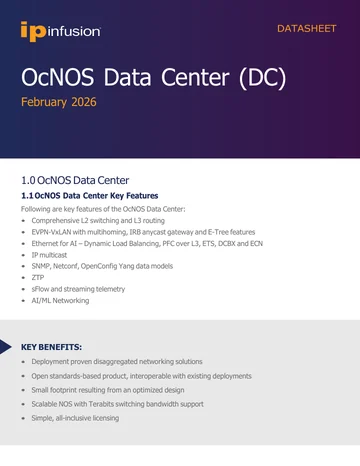
OcNOS-DC Datasheet
Full OcNOS-DC specification: the EVPN-VXLAN and Ethernet for AI feature set, software SKUs, supported hardware platforms, and the solution ordering guide.
Get the datasheet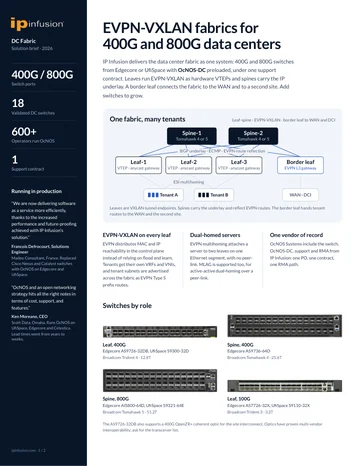
EVPN-VXLAN Data Center Fabric
Leaf-spine data center fabric on EVPN-VXLAN: a VRF and VNIs per tenant, EVPN multihoming, BGP unnumbered and route-target filtering.
Get the brief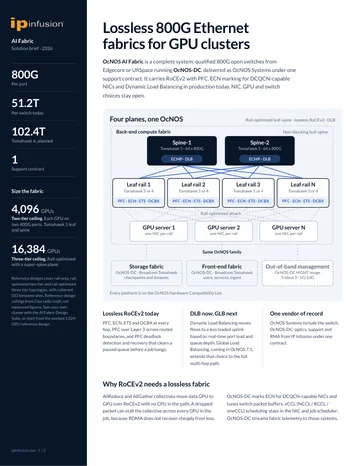
OcNOS 800G Lossless AI Fabric
Lossless RoCEv2 fabric on Tomahawk 5 spines: SKU tiers, qualified platforms, and deployment architecture.
Get the briefOcNOS-DC Datasheet
Quick form. Your PDF opens in a new tab immediately after submit.
✓ Opening your PDF in a new tab…
If it didn't open, use the link below.
EVPN-VXLAN Data Center Fabric
Quick form. Your PDF opens in a new tab immediately after submit.
✓ Opening your PDF in a new tab…
If it didn't open, use the link below.
OcNOS 800G Lossless AI Fabric
Quick form. Your PDF opens in a new tab immediately after submit.
✓ Opening your PDF in a new tab…
If it didn't open, use the link below.