Layer-3-VPNs (L3VPNs) bieten Service Providern eine hoch skalierbare, mandantenfähige Architektur, die sichere Kundenverbindungen vereinfacht isolation over a unified infrastructure. To maintain strict Service Level Agreements (SLAs), Day-2 operations depend on systematic health verification frameworks. This runbook establishes a structured verification lifecycle, spanning from the customer edge demarcation point straight to the provider transport core, equipping operations teams with a prescriptive method to audit and validate forwarding health layer by layer. This structured approach scales cleanly across services, preserving network virtualization and customer-level separation.
Topology Description
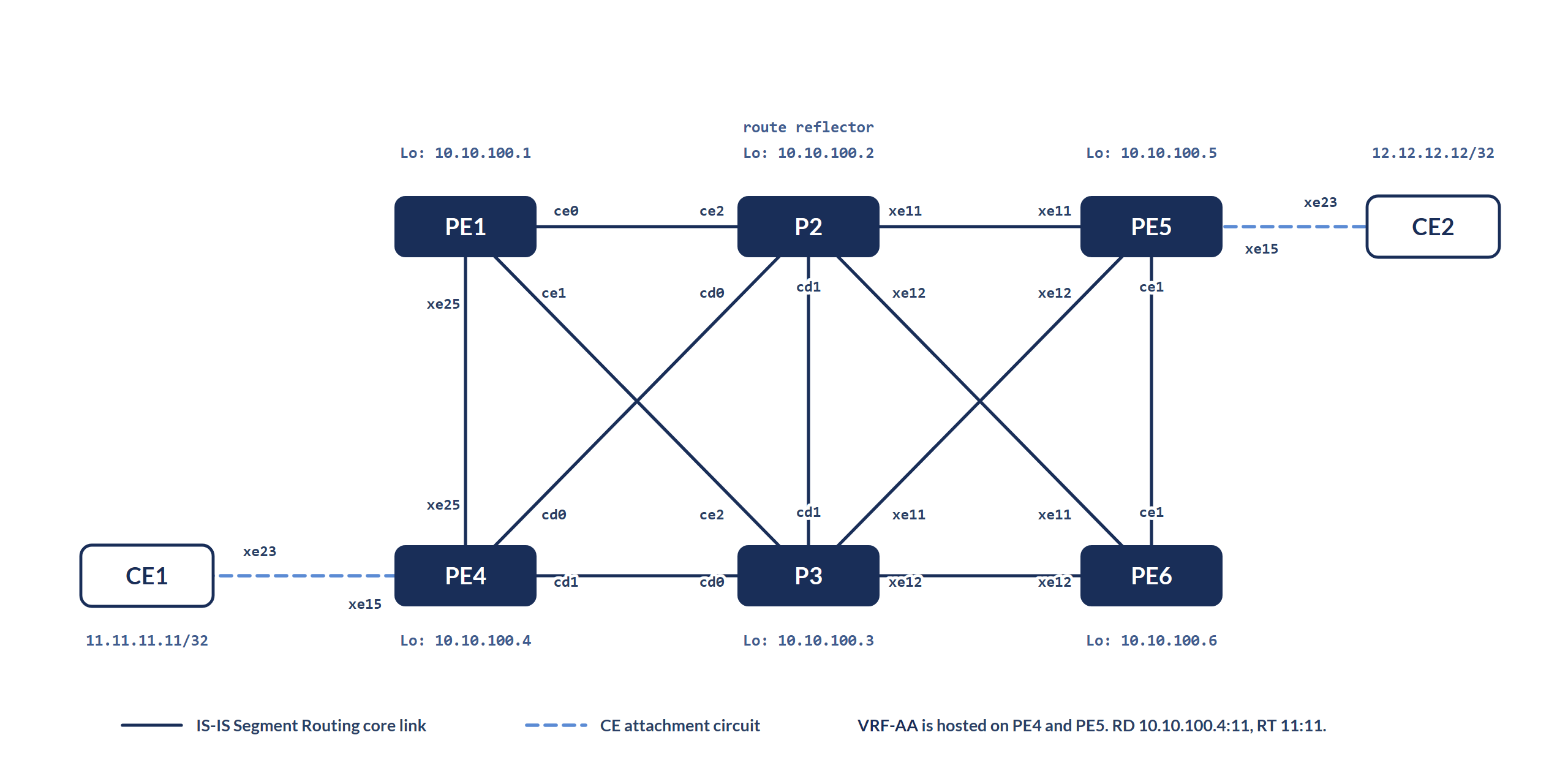
The topology comprises six PE/P routers with loopback IP addresses in the format 10.10.100.X/32, where X represents the device number. Interface IP addresses follow the format 10.66.YZ.A/24, where YZ denotes the pair of connected devices in ascending numerical order, and A is the device number. The IGP deployed is single domain IS-IS with Segment Routing (ISIS-SR). Router P2 functions as the route reflector (RR) for the BGP VPNv4 address family. PE4 and PE5 serve as edge routers, hosting an L3VPN service under the VRF named VRF-AA.
End-to-End Connectivity Validation
The validation covers connectivity from CE1's loopback (11.11.11.11/32) to CE2's loopback (12.12.12.12/32), and the reverse path from CE2 (12.12.12.12/32) back to CE1 (11.11.11.11/32), to confirm the L3VPN correctly transports traffic between the two customer sites in both directions.
Standard Operating Procedure (SOP) / Diagnostic Flow
Phase 1: Edge Handoff Validation
1.1 IF EBGP session (CE1 ⇌ PE4) is NOT Established
        THEN Fix BGP peering (check ASN, IP, ACL, etc.)
     ELSE Continue
1.2 IF Customer prefixes are NOT received from CE
        THEN
            a. Check inbound BGP policies
            b. Validate route advertisement from CE
     ELSE Continue
1.3 IF inter-VRF route leaking is expected
        THEN Verify route-target import/export configuration
1.4 IF ACLs are configured
THEN Ensure ACLs are not blocking CE-originated trafficPhase 2: Service & Routing Validation
2.1 IF VRF is NOT configured or missing correct route-targets
        THEN Fix VRF configuration and RTs
2.2 IF VPNv4 routes are NOT received from remote PEs
        THEN
            a. Check MP-BGP session between PEs
            b. Verify address-family VPNv4 activation
            c. Check route export from remote PE
2.3 IF customer route is NOT present in VRF RIB
        THEN Debug BGP import/export policies and route-map filters
2.4 IF route is NOT present in VRF forwarding table
        THEN
            a. Check label bindings
            b. Verify MPLS forwarding path
    2.4.1 Hardware Programming Verification:
        - Check software-to-hardware programming for the service
Phase 3: Core Transport Validation
3.1 IF destination PE loopback is NOT reachable via ping/traceroute
        THEN
            a. Validate IGP reachability to loopback
            b. Check for LDP/SR label bindings
3.2 IF no valid LSP exists to destination PE
        THEN
            a. Troubleshoot LDP/SR adjacency and label advertisement
            b. Confirm loopback is advertised in IGP
    3.2.1 Hardware Programming Verification:
        - Confirm hardware reflects correct transport programming at both source and transit routers
Command-Level Walkthrough
Phase 1: Edge Handoff Validation
Begin at the source PE router (PE4), checking the routes received from the locally connected CE router.
Verify the status of the BGP session, assuming eBGP is configured between the PE4 and CE1 routers. For other routing protocols, check the respective session status as applicable.
Check if the BGP session is up.
show ip bgp summary vrf VRF-AA
PE4#sh ip bgp summary vrf VRF-AA
BGP router identifier 11.1.1.1, local AS number 65000
BGP VRF VRF-AA Route Distinguisher: 10.10.100.4:11
BGP table version is 3
3 BGP AS-PATH entries
0 BGP community entries

Neighbor           V    AS     MsgRcv      MsgSen  TblVer    InQ   OutQ   Up/Down  State/PfxRcd    Desc
11.1.1.2           4   200          77         85       3      0      0  00:07:05              2

Total number of neighbors 1

Total number of Established sessions 1
PE4#
Look for:
State/Prefixes received: When the BGP session is in the Established state, this field displays the number of prefixes received from the CE router. If the session is down, the field will indicate the corresponding BGP state (e.g., Idle, Active, or Connect).
If the session is down:
- Confirm IP connectivity using ping
- Verify neighbor configuration, ASN, and update-source on the PE
Check Customer Routes on PE4
Once BGP is up, check if PE4 is receiving routes:
show bgp neighbors 11.1.1.2 received-routes
PE4#show bgp neighbors 11.1.1.2 received-routes
% Inbound soft reconfiguration is not supported, displaying the received routes from accessing BGP local RIB

For address family: IPv4 Unicast
BGP table version is 3, local router ID is 11.1.1.1
Status codes: s suppressed, d damped, h history, a add-path, b back-up, * valid, > best, i - internal,
              l - labeled, S Stale, x-EVPN MPLS
Origin codes: i - IGP, e - EGP, ? - incomplete

    Network          Next Hop             Metric    LocPrf   Weight Path
*> l 11.1.1.0/24      11.1.1.2              0        100       0    200 ?
*> l 11.11.11.11/32   11.1.1.2              0        100       0    200 ?
Total number of prefixes 2
PE4#
If no routes are seen, inspect CE1 configuration or export policy
Route Leaking Between VRFs (Optional)
In some topologies, VRF route leaking is required.
- Use import route-target and export route-target carefully
- Or implement BGP route-target export/import policies
- Consider static route leaking if required
Verify ACLs
ACLs can impact both BGP session establishment and data plane traffic:
- Ensure no ACLs are applied on PE/CE interfaces blocking routing traffic
- Look for entries denying BGP (TCP 179) or relevant IP prefixes
show ip access-lists
PE4#show ip access-lists
PE4#
Phase 2: Service & Routing Validation: VRF, BGP, and Route Leaking
2.1 Confirm VRF and Route-Target Configuration
Ensure the PE has the correct VRF settings.
show running-config vrf VRF-AA
PE4#show run vrf VRF-AA
!
ip vrf VRF-AA
 rd 10.10.100.4:11
 route-target both 11:11
!
PE4#
show ip vrf VRF-AA
PE4#show ip vrf VRF-AA
VRF VRF-AA, VRF ID: 2, FIB ID 2, MTU 1500
MPLS DSCP Preserve Disbaled (global)
 Router ID: 11.1.1.1 (automatic)
Interfaces:
  lo.VRF-AA
  xe15.111
VRF VRF-AA; default RD 10.10.100.4:11
 RT:11:11
Import VPN route-target communities
 RT:11:11
No import route-map
No export route-map
VPNv4 label allocation mode: per-vrf
VPNv6 label allocation mode: per-vrf
PE4#
Check for:
- Correct RD (Route Distinguisher)
- Matching RTs (Route Targets) between PEs
2.2 Check VPNv4 Route Exchange
Verify that PE is receiving VPNv4 routes from remote PE.
show ip bgp vpnv4 vrf VRF-AA 12.12.12.12
PE4#show ip bgp vpnv4 vrf VRF-AA 12.12.12.12
Route Distinguisher: 10.10.100.4:11 (Default for VRF VRF-AA) Routing Entry for prefix: 12.12.12.12/32
  Not advertised to any peer
  AS path:300
  Path Selection reason: Nothing left to compare
   Nexthop:10.10.100.5  (IGPmetric  20) from 10.10.100.2 (Originator Id:10.10.100.5)  (Remote Id:10.10.100.2) Peer nexthop: 10.10.100.2
      Origin incomplete, metric  0, localpref 100, Out-label 24320      valid, internal,  best, source-safi: 128
      Duplicated: (source VRF-ID: 0, source VRF: DEFAULT, VRF-External, imported)
      Extended Community: RT:11:11
      Originator: 10.10.100.5, Cluster list: 10.10.100.2
      rx path_id: -1      tx  path_id: -1
      Add-Path Announcement: Not advertised to any peer
      Last update: Mon Jun  2 05:25:56  2025, 00:44:35 ago

PE4#
Expected Output:
- Prefix shows up
- Next-hop points to the destination PE loopback (e.g., 10.10.100.5)
If route is missing:
- Validate RT import/export
- Check BGP policies or filters
2.3 Check Route in VRF RIB
Confirm that the VPN route has been installed in the VRF RIB.
show ip route vrf VRF-AA database
PE4#show ip route vrf VRF-AA database
Codes: K - kernel, C - connected, S - static, R - RIP, B - BGP
       O - OSPF, IA - OSPF inter area
       N1 - OSPF NSSA external type 1, N2 - OSPF NSSA external type 2
       E1 - OSPF external type 1, E2 - OSPF external type 2
       i - IS-IS, L1 - IS-IS level-1, L2 - IS-IS level-2,
       ia - IS-IS inter area, E - EVPN,
       v - vrf leaked
       > - selected route, * - FIB route, p - stale info

IP Route Table for VRF "VRF-AA"
C    *>   11.1.1.0/24  is directly connected, xe15.111, installed 04:45:53, last update 04:45:53 ago
B         11.1.1.0/24  [20/0] via 11.1.1.2, xe15.111 inactive, installed 04:40:11, last update 04:40:11 ago
B    *>   11.11.11.11/32  [20/0] via 11.1.1.2, xe15.111, installed 04:40:11, last update 04:40:11 ago
B     >   12.1.1.0/24  [200/0] via 10.10.100.5, installed 04:38:35, last update 04:38:35 ago
B     >   12.12.12.12/32  [200/0] via 10.10.100.5, installed 04:38:35, last update 04:38:35 ago
C    *>   127.0.0.0/8  is directly connected, lo.VRF-AA, installed 04:47:54, last update 04:47:54 ago

Total number of IPv4 routes 6

Gateway of last resort is not set
PE4#
Here, routes learnt through local/connected interfaces are marked "*>" (selected and FIB-installed), while routes learnt via VPNv4, i.e., labelled routes received over MP-BGP, are marked ">".
show ip route vrf VRF-AA 12.12.12.12
PE4#show ip route vrf VRF-AA 12.12.12.12
VRF: VRF-AA, Routing entry for 12.12.12.12/32
  Known via "bgp", distance  200, metric 0,  External Route Tag: 300, installed  00:03:02,  best
  Last update 00:03:02 ago
    10.10.100.5

PE4#
If VPNv4 BGP route exists but no route in VRF:
- Likely an RT mismatch or route-policy is filtering
2.4 Check MPLS forwarding entries in VRF
show mpls vrf-forwarding-table displays the L3VPN service FTNs received from remote PE via MP-BGP.
PE4#show mpls vrf-forwarding-table 12.12.12.12/32
Codes: > - installed FTN, * - selected FTN, p - stale FTN, ! - using backup, B - BGP FTN
(m) - Service mapped over multipath transport
(e) - Service mapped over LDP ECMP or SR ECMP
B(x) - BGP EVPN MPLS Services

Code    FEC                  FTN-ID VRF-ID    Nhlfe-ID    Pri   Out-Label    Out-Intf         Nexthop          UpTime
   B>   12.12.12.12/32      4          2      9           Yes   24320        -                 10.10.100.5     00:20:57
PE4#
show mpls vrf-table provides detailed information on L3VPN service FTNs.
PE4#show mpls vrf-table 12.12.12.12/32
Output for IPv4 VRF table with id: 2 (fib_id: 2)
 Primary FTN entry with FEC: 12.12.12.12/32, id: 4, row status: Active, Tunnel-Policy: N/A, State: Installed
  CreateTime: 00:21:54, UpTime: 00:21:54, LastUpdate: N/A
  Owner: BGP, distance: 0, Action-type: Redirect to LSP, Exp-bits: 0x0, Incoming DSCP: none
  VRF id 2, FIB id 2, BGP peer 10.10.100.5 BGP prefix 12.12.12.12
  Transport Tunnel id: 0, Protected LSP id: 0, LSP-type: Primary, Description: N/A, , Color: 0
     Cross connect ix: 16, in intf: - in label: 0 out-segment ix: 9 refcount: 2
      Owner: BGP, Persistent: No, Admin Status: Up, Oper Status: Up
       Out-segment with ix: 9, owner: BGP, Stale: NO, refcount: 1, BGP out intf: xe25, transport out intf: xe25, out label: 24320
    Nexthop addr: 10.10.100.5      cross connect ix: 16, op code: Push and Lookup

PE4#
Hardware Programming Verification
show hsl mpls l3vpn-ftn checks the L3VPN service FTN at hardware (HSL) layer, if the above entry is installed. Record lsp_encap und fec.
PE4#show hsl mpls l3vpn-ftn 12.12.12.12/32
mpls_vrf_table
---------------
VRF ID:2   FEC:12.12.12.12/32  owner:B  refcnt:2  rulecnt:0  retrycnt:0
  Up_time:00:26:39  time_since_last_update:N/A  update_count:0
  MPLS-ifname:N/A  nh-type:MPLS  flags:0x40009  ext-flags:0x0
  Out-label:24320  nhlfe-ix:9  alive-counter:0  out-intf:  NextHop:10.10.100.5
  fec:0x2000ccf2  port:0x98026680  lsp_encap:0x40100033  ll_encap:0xffffffff

Reference Count:2   Prefix count:2

PE4#
show hsl hw unit 0 encap-db count 65534 checks the encap-db entries for respective service FTN lsp_encap and the service label.
PE4#show hsl hw unit 0 encap-db count 65534 | in 0x40100033
43       0x40100033 0xffffffff                     24320    0x0        Rif
PE4#
show hsl hw unit 0 route ipv4 checks for the respective routes fec.
PE4#show hsl hw unit 0 route ipv4 | in 12.12.12.12|10.10.100.5
   25      0      10.10.100.5         32  0x20026680
   33      2      12.12.12.12         32  0x2000ccf2
PE4#
show hsl prefix-table ipv4 12.12.12.12/32 gives details on service FTN.
PE4#show hsl prefix-table ipv4 12.12.12.12/32
IPv4 FIB 0

IPv4 FIB 1

IPv4 FIB 2
 12.12.12.12/32, Installed (MPLS), *, TUNMPLS nhlfe 9, ftn-type BGP-VRF,
                          10.10.100.5, Null, 00:00:00:00:00:00, Valid  , Static:No, Refresh(Static):UnsetRefresh2(Dynamic):Unset, evpn_nh_mac 00:00:00:00:00:00, evpn_nh_vnid:0, is_evpn_nh_link
ed_to_arp_hash:0, NHLFE ID-9 , lport:0x98026680, EgrObjId:0x2000ccf2, refcnt:2, rulecnt:0, multipath refcnt 0, FailoverId:0xffffffff SwState:Primary RefCnt:0

PE4#
show hsl nh-table ipv4 10.10.100.5 gives details on transport FTN and the service FTN attached to this transport FTN.
PE4#show hsl nh-table ipv4 10.10.100.5
IPv4 FIB 0

IPv4 FIB 1

IPv4 FIB 2
10.10.100.5, Null, 00:00:00:00:00:00, Valid  , Static:No, Refresh(Static):UnsetRefresh2(Dynamic):Unset, evpn_nh_mac 00:00:00:00:00:00, evpn_nh_vnid:0, is_evpn_nh_linked_to_arp_hash:0, NHLFE ID
-9 , lport:0x98026680, EgrObjId:0x2000ccf2, refcnt:2, rulecnt:0, multipath refcnt 0, FailoverId:0xffffffff SwState:Primary RefCnt:0,
                      12.1.1.0/24, Installed FORWARD, *, TUNMPLS
                      12.12.12.12/32, Installed FORWARD, *, TUNMPLS

PE4#
Verify step-2 from destination PE as well.
Phase 3: Core Transport Validation
Once both PEs have the correct service entries for both NSM and HSL, validate the transport path between them.
3.1 Ping and Traceroute to PE Loopback
ping mpls isis-sr ipv4 10.10.100.5/32 detail
PE4#ping mpls isis-sr ipv4 10.10.100.5/32 detail
Sending 5 MPLS Echos to 10.10.100.5, timeout is 5 seconds

Codes:
'!' - Success, 'Q' - request not sent, '.' - timeout,
'x' - Retcode 0, 'M' - Malformed Request, 'm' - Errored TLV,
'N' - LBL Mapping Err, 'D' - DS Mismatch,
'U' - Unknown Interface, 'R' - Transit (LBL Switched),
'B' - IP Forwarded, 'F' No FEC Found, 'f' - FEC Mismatch,
'P' - Protocol Error, 'X' - Unknown code,
'Z' - Reverse FEC Validation Failed

 Type 'Ctrl+C' to abort

! seq_num = 1 10.66.25.5 1.09 ms
! seq_num = 2 10.66.25.5 0.77 ms
! seq_num = 3 10.66.25.5 0.69 ms
! seq_num = 4 10.66.25.5 0.75 ms
! seq_num = 5 10.66.25.5 0.74 ms

Success Rate is 100.00 percent (5/5)
round-trip min/avg/max = 0.69/0.89/1.09
PE4#
trace mpls isis-sr ipv4 10.10.100.5/32 detail
PE4#trace mpls isis-sr ipv4 10.10.100.5/32 detail
Tracing MPLS Label Switched Path to 10.10.100.5, timeout is 5 seconds

Codes:
'!' - Success, 'Q' - request not sent, '.' - timeout,
'x' - Retcode 0, 'M' - Malformed Request, 'm' - Errored TLV,
'N' - LBL Mapping Err, 'D' - DS Mismatch,
'U' - Unknown Interface, 'R' - Transit (LBL Switched),
'B' - IP Forwarded, 'F' No FEC Found, 'f' - FEC Mismatch,
'P' - Protocol Error, 'X' - Unknown code,
'Z' - Reverse FEC Validation Failed

 Type 'Ctrl+C' to abort

  0 10.66.14.4  [Labels:  16105]
R 1 10.66.14.1  [Labels:  16105] 0.85 ms
R 2 10.66.12.2  [Labels: implicit-null] 0.67 ms
! 3 10.66.25.5 0.91 ms

PE4#
If not reachable, investigate IGP or underlying transport, where the trace is breaking.
3.2 Validate MPLS Label Switched Path (LSP)
show mpls forwarding-table 10.10.100.5/32, perform this check on the source router for destination PE router installed entry.
PE4#show mpls forwarding-table 10.10.100.5/32
Codes: > - installed FTN, * - selected FTN, p - stale FTN, ! - using backup
       B - BGP FTN, K - CLI FTN, (t) - tunnel, P - SR Policy FTN, (b) - bypass,
       L - LDP FTN, R - RSVP-TE FTN, S - SNMP FTN, I - IGP-Shortcut,
       U - unknown FTN, O - SR-OSPF FTN, i - SR-ISIS FTN, k - SR-CLI FTN
       (m) - FTN mapped over multipath transport, (e) - FTN is ECMP

FTN-ECMP LDP: Disabled, SR: Enabled
Code    FEC                  FTN-ID    Nhlfe-ID  Tunnel-ID   Pri   Out-Label    Out-Intf     ELC       Nexthop         UpTime
   i>   10.10.100.5/32      8          74        -           -     -            -           -          -               01:17:50
                                       33        0           Yes   16105        xe25        No         10.66.14.1      -
                                       32        -           No    16105        cd0         No         10.66.24.2      -
PE4#
show mpls ilm-table 10.10.100.5/32 (ILM: Incoming Label Map), perform this check on all the transit routers for destination PE router installed entry.
P1#show mpls ilm-table 10.10.100.5/32
Codes: > - installed ILM, * - selected ILM, p - stale ILM, ! - using backup
       K - CLI ILM, T - MPLS-TP, s - Stitched ILM
       S - SNMP, L - LDP, R - RSVP, C - CRLDP
       B - BGP , K - CLI , V - LDP_VC, I - IGP_SHORTCUT
       O - OSPF/OSPF6 SR, i - ISIS SR, k - SR CLI
       P - SR Policy,     U - unknown, UPStr - upstream

ILM-ECMP LDP: Disabled, SR: Enabled
Code    FEC/VRF/L2CKT    ILM-ID       In-Label    Out-Label   In-Intf    Out-Intf/VRF       Nexthop                  pri  UpTime    UPStr-peers
   i>   10.10.100.5/32     8            16105       16105       N/A        ce0               10.66.12.2              Yes  01:21:50
                                        16105       16105       N/A        xe25              10.66.14.4              No   -
P1#
Hardware Programming Verification
show hsl mpls ftn checks the transport FTN at hardware (HSL) layer, if the above FTN entry is installed. Record lsp_encap for primary path.
PE4#show hsl mpls ftn 10.10.100.5/32
FTN Table
----------
FEC:10.10.100.5/32  nhlfe-ix:74  owner:I  refcnt:2  flags:0x0  entropy:0  mem_count:1
  up_time:01:27:28  time_since_last_update:01:20:55  update_count:4
  ecmp_fec:[0x20026680:0x20026680]  mem_base_fec:[0x20026680:0xffffffff]  hw_mem_count:1  factor:2
Member details:
  PRI : nhlfe_ix:33    out-label:16105     out-intf:xe25     NextHop:10.66.14.1  flags:0x0   switch-to-bkp:FALSE
        fec:0x20026680  port:0x6c00002e lsp_encap:0x4010005b ll_encap:0x4010005a failover_id:0x4000401f
  BKP : nhlfe_ix:32    out-label:16105     out-intf:cd0      NextHop:10.66.24.2  flags:0x0
        fec:0x20026681  port:0x6c000001 lsp_encap:0x40100038 ll_encap:0x40100062
       Dependent Bypass tunnel info:
          Tunnel_id:2204 lsp_id:4    nhlfe_ix:19    status:resolved

Reference Count:2   Prefix count:1   VC count:0   LU-FTN count:0   ILM count:0   L3VPN RefCount:1   EVPN RefCount:0   SR-BKP-nh count:0
 vpn_vrf_ftn_list
   vpn_label  lport       bkp_lport  prim_fec   bkp_fec    failover_id  prim_lsp_encap   bkp_lsp_encap   prim_ll_encap   bkp_ll_encap    tnl_policy
   24320      0x98026680 0xffffffff  0x2000ccf2 0xffffffff 0xffffffff   0x40100033       0xffffffff      0xffffffff      0xffffffff      no

PE4#
show hsl hw unit 0 encap-db count 65534 checks the encap-db entries for respective transport FTN and the label.
PE4#show hsl hw unit 0 encap-db count 65534 | in 0x4010005b
73       0x4010005b 0xffffffff                     16105    0x4010005a Tunnel3
PE4#
show hsl mpls ilm checks the transport ILM at hardware (HSL) layer, if the above ILM entry is installed. Record lsp_encap for primary path.
P1#show hsl mpls ilm 16105
Ilm Table
----------
Opcode:SWAP  in-Label:16105  in-intf:N/A(0)  label-space:0  flags:0x1  up_time:01:28:47
Owner:I  Egress details:
nhlfe-ix:71  owner:I  refcnt:1  flags:0x0  entropy:0  mem_count:1
  ecmp_fec:[0x20026674:0x20026674]  mem_base_fec:[0x20026674:0xffffffff]  hw_mem_count:1  factor:2
Member details:
  PRI : nhlfe_ix:36    out-label:16105     out-intf:ce0      NextHop:10.66.12.2  flags:0x0   switch-to-bkp:FALSE
        fec:0x20026674  port:0x6c000001 lsp_encap:0x4010002c ll_encap:0x40100025 failover_id:0x40004017
  BKP : nhlfe_ix:69    out-label:16105     out-intf:xe25     NextHop:10.66.14.4  flags:0x0
        fec:0x20026675  port:0x6c000020 lsp_encap:0x4010004a ll_encap:0x4010003c
       Dependent Bypass tunnel info:
          Tunnel_id:2206 lsp_id:4    nhlfe_ix:65    status:resolved

Reference Count:1   Prefix count:0   VC count:0   LU-FTN count:0   ILM count:1   L3VPN RefCount:0   EVPN RefCount:0   SR-BKP-nh count:0
 ilm_list
   in_label   out_label  opcode      flags      out_nhlfe  out_fec
   16105      1          3           0x1        71         0x2000ccdc

P1#
show hsl hw unit 0 encap-db count 65534 checks the encap-db entries for respective transport ILM and the label.
P1#show hsl hw unit 0 encap-db count 65534 | in 0x4010002c
33       0x4010002c 0xffffffff                     16105    0x40100025 Tunnel3
P1#
Common Scenarios and Fixes
| Issue | Root Cause | Fix |
|---|---|---|
| BGP session down (CE-PE) | ASN mismatch, unreachable IP | Check config, use ping, correct ASN |
| No routes in VRF RIB | RT mismatch or route-policy block | Align RTs or modify policy |
| VPNv4 route not present | BGP not advertising or importing | Check BGP config and RTs |
| LSP up on one side only | Label not programmed or LSP broken | Fix label forwarding or IGP issue |
| Routes not leaked between VRFs | No leak policy or wrong RT | Add proper RT import/export |
Conclusion
Managing enterprise-scale L3VPN environments becomes a highly repeatable process when structured into the three-phase operational model used throughout this runbook: Edge Handoff Validation (CE to PE), Service & Routing Validation, and Core Transport Validation. Adhering to an outside-in audit workflow, starting at the outermost Customer Edge (CE) and moving inward toward the MPLS core, ensures that peripheral demarcation issues are never overlooked. By institutionalizing this systematic approach to BGP mechanics, Route Target policies, and label forwarding states, engineering organizations can accelerate team onboarding and ensure that operations personnel at any level can confidently maintain service delivery.