Part of IP Infusion's guide to Segment Routing.
Migrating from LDP to Segment Routing is one of the most common infrastructure projects facing service provider network teams. The good news: OcNOS supports a phased migration model where LDP and SR-MPLS coexist on the same network simultaneously, so operators can migrate one node at a time without service disruption or maintenance windows.
Why Migrate from LDP to SR?
| Capacité | LDP | SR-MPLS |
|---|---|---|
| Signaling protocol | Separate LDP sessions | None; the IGP distributes SIDs |
| Transit router state | Per-prefix label binding | Stateless; only node SIDs |
| Ingénierie de trafic | Not supported | SR-TE and Flex-Algo |
| Reroutage rapide | LFA only (~60-80%) | TI-LFA (100%) |
| IGP synchronization | Complex (LDP-IGP sync) | Native; no sync needed |
| Operational complexity | High (two protocol stacks) | Low (IGP only) |
Migration Strategy: Three Phases
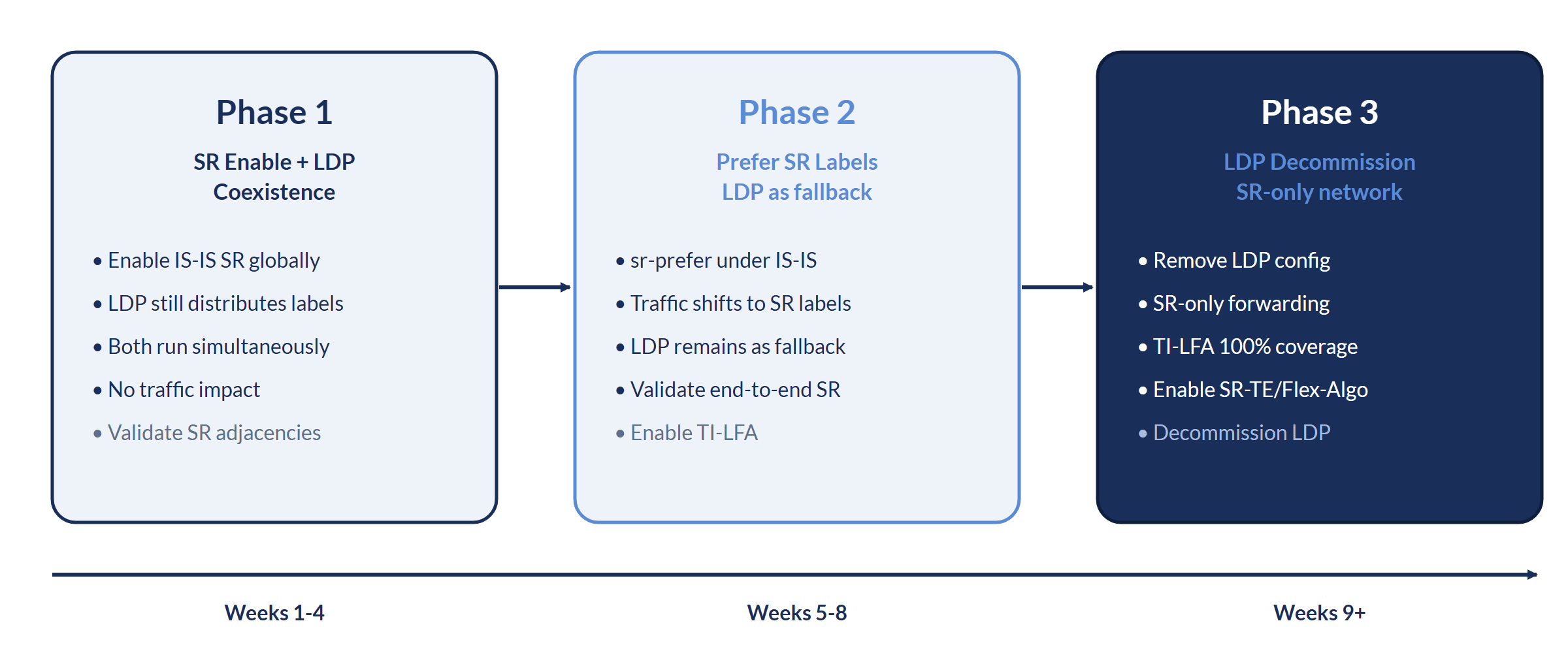
Phase 1: Enable SR with LDP Coexistence
In Phase 1, Segment Routing is enabled on the IS-IS domain while LDP continues to operate. Both protocols distribute labels simultaneously. Traffic continues to use LDP labels, so this phase is purely additive and carries zero risk.
! OcNOS Phase 1: enable IS-IS SR alongside existing LDP
!
! Step 1: assign a node SID on the loopback (new config, no traffic impact)
interface loopback1
 ip address 10.10.100.1/32
 prefix-sid index 101
!
! Step 2: enable Segment Routing under the IS-IS instance (non-disruptive)
router isis OCNOS
 is-type level-2-only
 metric-style wide
 net 49.0001.0000.0000.1111.00
 passive-interface loopback1
 mpls traffic-eng level-2
 segment-routing mpls
!
commit
end
!
! LDP stays fully operational. Both LDP and SR labels are now distributed.
! Verify SR is active alongside LDP:
show isis topology
show mpls forwarding-table       ! Code i = SR-ISIS FTN, L = LDP FTN
show mpls ilm-tablePhase 2: Prefer SR Labels (Traffic Cutover)
Phase 2 switches traffic from LDP labels to SR labels using the mpls sr-prefer knob under the global segment-routing context. LDP sessions remain active as a fallback during validation. This is the actual traffic migration step, and it can be applied per node and rolled back immediately if needed.
! OcNOS Phase 2: prefer SR labels, keep LDP as fallback
!
configure terminal
segment-routing
 mpls sr-prefer
!
commit
end
!
! Traffic now uses SR labels; LDP stays installed as a fallback.
! Verify SR is selected (Code i> = SR-ISIS FTN selected, LDP FTN retained):
show mpls forwarding-table
!
! Confirm end-to-end SR reachability across the core:
ping mpls isis-sr ipv4 10.10.100.5/32 detail
!
! LDP is still available as a fallback:
ping mpls ldp 10.10.100.5/32 detail
Phase 3: Decommission LDP
Once every node is preferring SR and traffic has been validated on SR labels, LDP can be removed. In OcNOS this is done per interface with disable-ldp ipv4; there is no global LDP-IGP sync knob to unwind. With SR now the sole label protocol, you can layer on SR-TE and Flex-Algo (see the Flex-Algo guide).
! OcNOS Phase 3: decommission LDP (SR-only operation)
!
! Disable LDP on each LDP-enabled interface (repeat across the core):
configure terminal
interface xe4
 disable-ldp ipv4
!
interface xe6
 disable-ldp ipv4
!
commit
end
!
! The box clears the LDP sessions, for example:
! LDP : CRITI : [LDP_SESSION_DOWN_2]: Clearing up session on interface xe4 with peer 10.10.100.2
!
! Final verification (only SR labels remain; FTN-ECMP LDP: Disabled):
show mpls forwarding-table
ping mpls isis-sr ipv4 10.10.100.1/32 detail
Rollback Procedure
If validation surfaces a problem during Phase 2, revert the label preference. Because LDP labels are still installed, traffic falls straight back to LDP.
! OcNOS: roll back Phase 2 (revert to LDP preference)
!
configure terminal
segment-routing
 no mpls sr-prefer
!
commit
end
!
! Traffic immediately reverts to LDP labels. Verify:
show mpls forwarding-table- Segment Routing Explained: SR-MPLS Fundamentals
- ISIS-SR with TI-LFA: Fast Reroute Guide
- Flex-Algo in OcNOS
- OcNOS-SP Product Page
- Contacter IP Infusion
IP Infusion Engineering Team
Approfondissez. Emportez-le avec vous.
La fiche technique du produit et des téléchargements techniques et concis qui vont plus loin que cette page.
Datasheet OcNOS-SP
Spécification complète OcNOS-SP : l'ensemble des fonctionnalités access, cell site et agrégation, les SKU logiciels, les plateformes matérielles prises en charge et le guide de commande de la solution.
Obtenir la fiche technique
Mise à niveau SR-MPLS avec OcNOS
Migrez SR-MPLS vers OcNOS sur du matériel ouvert : Flex-Algo, TI-LFA et une bascule nœud par nœud.
Obtenir le brief
Transport WAN Cloud & Opérateurs
Transport WAN pour le cloud et les service provider sur du matériel ouvert : SR-MPLS, EVPN et transfert testé à l'échelle.
Obtenir le briefDatasheet OcNOS-SP
Formulaire rapide. Votre PDF s'ouvre dans un nouvel onglet immédiatement après l'envoi.
✓ Ouverture de votre PDF dans un nouvel onglet…
S'il ne s'est pas ouvert, utilisez le lien ci-dessous.
Mise à niveau SR-MPLS avec OcNOS
Formulaire rapide. Votre PDF s'ouvre dans un nouvel onglet immédiatement après l'envoi.
✓ Ouverture de votre PDF dans un nouvel onglet…
S'il ne s'est pas ouvert, utilisez le lien ci-dessous.
Transport WAN Cloud & Opérateurs
Formulaire rapide. Votre PDF s'ouvre dans un nouvel onglet immédiatement après l'envoi.
✓ Ouverture de votre PDF dans un nouvel onglet…
S'il ne s'est pas ouvert, utilisez le lien ci-dessous.