OcNOS 6.6.1 is now generally available. This release delivers the complete AI fabric solution on Broadcom Tomahawk 5-based open hardware, building on the PFC and ETS foundations introduced in OcNOS 6.6 to provide a production-ready lossless RoCEv2 fabric for AI GPU clusters. Service provider deployments benefit from additional Segment Routing enhancements and expanded EVPN coverage.
Complete AI Fabric on Broadcom Tomahawk 5
OcNOS 6.6.1 DC delivers full lossless AI fabric support on Tomahawk 5 platforms including the UfiSpace S9321-64EO (64×800G OSFP, 51.2 Tbps). This includes Priority-Based Flow Control (PFC), Enhanced Transmission Selection (ETS), DCBX auto-negotiation, Explicit Congestion Notification (ECN), and RDMA-aware queue management, all validated for production RoCEv2 GPU workloads.
| Capacidad | OcNOS 6.6 | OcNOS 6.6.1 |
|---|---|---|
| PFC (Priority-Based Flow Control) | Initial (select platforms) | ✓ Full TH5 support |
| ETS (bandwidth allocation) | Initial | ✓ Full TH5 support |
| DCBX auto-negotiation | Partial | ✓ IEEE and CEE modes |
| ECN (congestion notification) | No | ✓ Full ECN marking |
| 800G platform (TH5) | No | ✓ UfiSpace S9321-64EO |
| RoCEv2 queue profiles | No | ✓ Pre-validated profiles |
! OcNOS 6.6.1 DC -- AI fabric configuration
!
configure terminal
qos enable
qos statistics
!
! Step 1: DSCP to traffic-class mapping for RoCEv2 and control traffic
qos profile dscp-to-queue AI-FABRIC-MAP
  dscp 24 queue 3                 ! RoCEv2 (CS3) -> traffic-class 3
  dscp 46 queue 5                 ! Expedited (EF) -> traffic-class 5
  exit
!
! Step 2: bandwidth guarantees per traffic class
policy-map type queuing default AI-SCHEDULER
  class type queuing default q5
    bandwidth percent 10          ! routing and signaling
    exit
  class type queuing default q3
    bandwidth percent 70          ! RoCEv2 (GPU all-reduce)
    exit
  class type queuing default q0
    bandwidth percent 20          ! best-effort
    exit
  exit
!
! Step 3: apply to the fabric port and enable lossless PFC
interface cd0
  qos map-profile dscp-to-queue AI-FABRIC-MAP
  service-policy type queuing output AI-SCHEDULER
  priority-flow-control mode on
  priority-flow-control advertise-local-config
  priority-flow-control enable priority 3 5
  exit
!
commit
exit
!
! Verification:
show priority-flow-control details all
show priority-flow-control statistics all
show dcbx details interface cd0
show running-config qosSegment Routing Enhancements (SP)
OcNOS 6.6.1 SP expands Segment Routing capabilities with additional Flex-Algo improvements including refined delay advertisement thresholds, improved algorithm convergence during topology changes, and enhanced SR-TE policy path computation. The RSVP Auto-Bypass feature is also introduced in this release; see the RSVP Auto Bypass guide para más detalles.
EVPN Service Expansion
OcNOS 6.6.1 expands EVPN coverage with improvements to EVPN-ETREE service handling, enhanced multi-homed ESI mass withdrawal timing, and improved EVPN IRB (Integrated Routing and Bridging) gateway performance for data center environments requiring simultaneous L2 and L3 forwarding within the same VNI.
- OcNOS 6.6 Release
- OcNOS 7.0: What's New
- RSVP Auto Bypass in OcNOS
- Matriz de funciones OcNOS
- Contactar con IP Infusion
IP Infusion Product Team
Profundice. Llévelo consigo.
Dos descargas técnicas y breves que profundizan más que esta página: el datasheet completo de OcNOS-SP y el datasheet completo de OcNOS-DC.
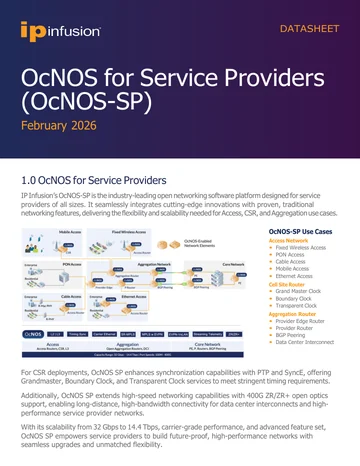
Datasheet de OcNOS-SP
Especificación completa de OcNOS-SP: el conjunto de funciones de acceso, cell site y agregación, los SKU de software, las plataformas de hardware compatibles y la guía de pedido de la solución.
Obtener el datasheet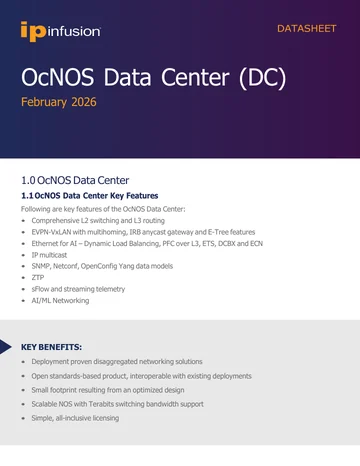
Datasheet de OcNOS-DC
Especificación completa de OcNOS-DC: el conjunto de funciones EVPN-VXLAN y Ethernet for AI, los SKU de software, las plataformas de hardware compatibles y la guía de pedido de la solución.
Obtener el datasheetDatasheet de OcNOS-SP
Formulario rápido. Su PDF se abre en una pestaña nueva inmediatamente después de enviarlo.
✓ Abriendo su PDF en una pestaña nueva…
Si no se ha abierto, utilice el enlace de abajo.
Datasheet de OcNOS-DC
Formulario rápido. Su PDF se abre en una pestaña nueva inmediatamente después de enviarlo.
✓ Abriendo su PDF en una pestaña nueva…
Si no se ha abierto, utilice el enlace de abajo.